Target Routing Policy
Description
The policy allows you to override the configured target host name in the service endpoint in order to forward request to the pre-inputs configured for the target host/domain for Package/Service Key. The policy Supports both Package and Service key level EAV (custom attributes). Using the list of configured target host/domain in the Load Balancing & Domains tab, it overrides all domains/target other than the configured cluster's target host defined in EAV.
Usage
Examples of the routing request according to the package/service key level EAV value and pre-input configurations are:
-
Create key level EAV with name cluster.
-
Enter the value in 'cluster' EAV created in the step above. For example: host1
-
Refer to the EAV.value in the pre-inputs of the Call transformation tab to set the target/domain route. For example:
cluster.host1:<target-host> -
The request is forwarded to the
<target-host>configured in pre-input configurations instead of the host configured under the Load Balancing & Domains tab.
Design and Implementation
Sequence Diagram
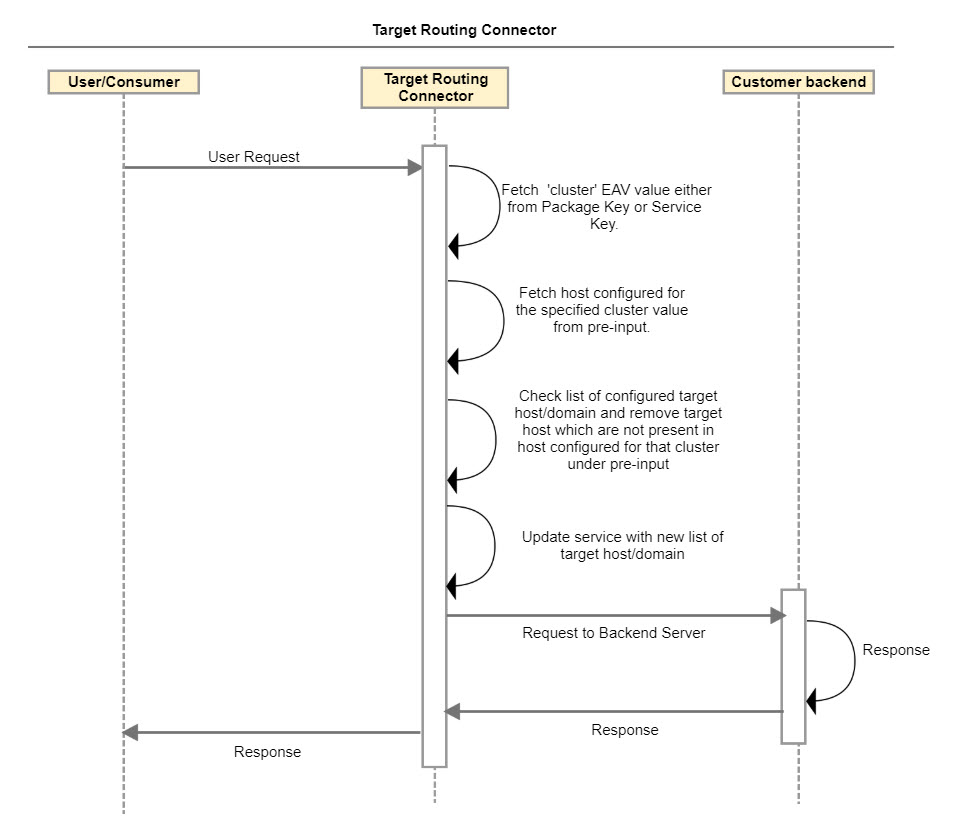
Implementation Details
-
The 'cluster' EAV value (configured under either Package Key or Service Key) is fetched when the request is pre-processed.
-
Fetch the host configured for the specified cluster value from the pre-input. Example: 'cluster' EAV value is defined as 'host1' under Service key. From the pre-input fetch the value specified for 'cluster.host1'. Pre-input will be specified in the following format: c
luster.host1=<target-host>:<Port-Number> -
Fetch list of configured target host/domain for the API service. This list is specified under the Load Balancing & Domain tab in the API Service definition.
-
The policy checks the list of the configured hosts/domains. If this list contains a host that is not specified for the cluster in the pre-input, then that host is removed from the list.
-
The service is updated with the new list of target hosts/domains and the request is sent to the backend server.
Configuring Call Transformation in Legacy UI
To configure Target routing policy call processing for an endpoint:
-
From the API Management Control Center dashboard, navigate to Design > API Definitions, then click the desired API definition from the list.
-
Click an existing endpoint on the Endpoints page.
-
Click Call Transformations in the left-hand menu.
-
On the Call Transformations page, specify the following information in these fields:
-
Processing Adapter: com.mashery.proxy.customer.generic.target-route-processor
-
Perform Pre-Processing: Enabled
-
Data to make available for pre-processing: (one per line)
Data Notes cluster.host2:<target-host>:<port-number>Optional cluster.host1:<target-host>Optional All
<target-host>values need to be enabled on the Load Balancing & Domains > System Endpoint Addresses field. -
Click Save.
-
